Your data
The short version: your reading is private to you by default. A few things are public, or can be made public, so they’re portable across the Atmosphere.
At a glance
Section titled “At a glance”| What | Where it lives | Visibility |
|---|---|---|
| Read state | Skyreader’s servers + your devices | Private |
| Subscriptions | Skyreader’s servers (+ your PDS if you opt in) | Private; public if Atmospheric sync is on |
| Saved articles | Skyreader’s servers + your devices | Private; public if backed by Semble or Margin |
| Highlights and notes | Skyreader’s servers + your devices | Private; a highlight you publish is public |
| Shared links (linkblog) | Your PDS | Always public |
| Recommends | Your PDS | Always public |
| Reading rooms | Your PDS (joins); Skyreader’s servers (reads) | Joining is public; reads are an anonymous count |
| Links from your follows | Skyreader’s servers, for a week | Private |
| Guest data | Your device only | Private |
Subscriptions and Atmospheric sync
Section titled “Subscriptions and Atmospheric sync”Your feed list is private, stored on Skyreader. Turning on Atmospheric sync (Settings → Library & privacy → Subscriptions) also stores it on your PDS, where it’s backed up, portable to any Atmospheric app, and publicly visible. That last part is the tradeoff to weigh: sync makes your subscription list something anyone can look up.
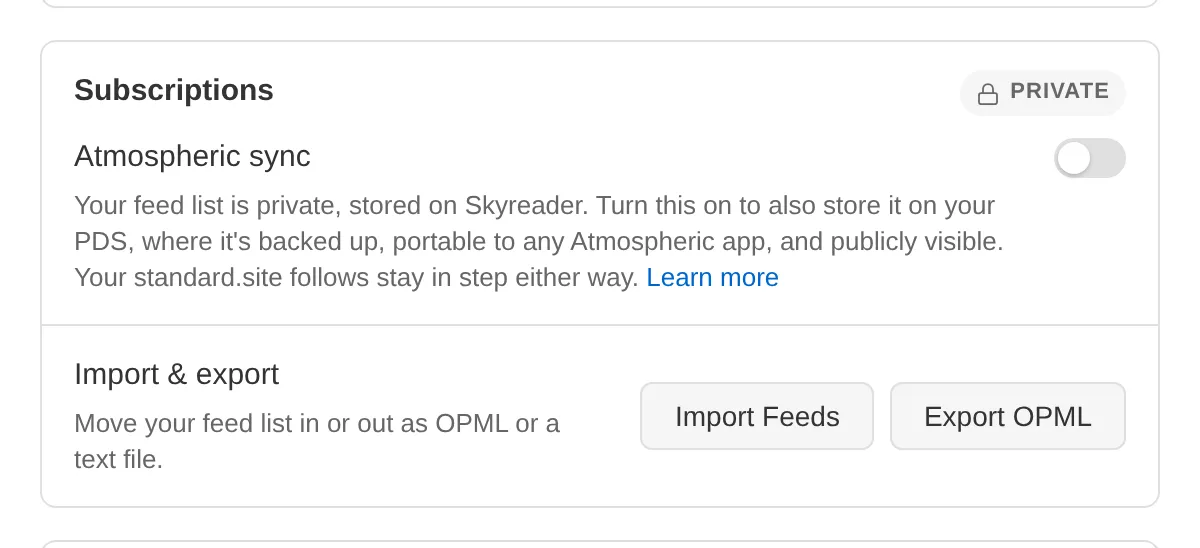
Sync covers subscriptions. It does not touch your saves, highlights, or read state.
Either way, you can walk away with your list at any time: Settings → Library & privacy → Export OPML.
Saved articles
Section titled “Saved articles”Saves live on Skyreader, private to you. They are not stored on your PDS.
The one way a save becomes public is choosing it: backing your Saved list with Semble or Margin (Settings → Library & privacy → Saved articles) turns the list into a public collection in that app.
Highlights and notes
Section titled “Highlights and notes”Highlights are private to Skyreader and sync across your devices through Skyreader, not through your PDS.
If you’d like to share a highlight publicly, you can share an individual highlight to Margin, which publishes that one highlight to your public PDS.
Your linkblog
Section titled “Your linkblog”Shared links are always public. That’s their point: a linkblog is a publication in your PDS, readable across the Atmosphere, with a public page and RSS feed. See Sharing.
Recommends
Section titled “Recommends”Recommending an article writes a public record to your PDS, so anyone can see what you’ve recommended. Take a recommend back and the record is deleted. See Recommending.
Reading rooms
Section titled “Reading rooms”Joining a room writes a public record to your PDS, so anyone can see you’re reading along. What you read in a room shows up only as an anonymous count, stored on Skyreader. See Reading rooms.
Links from your follows
Section titled “Links from your follows”If you turn on From your follows, Skyreader reads your Bluesky Following timeline and keeps the links it finds for a week, privately. Reading your follows never posts anything; Skyreader posts to Bluesky only when you tick Also on Bluesky on a share, post a highlight there, or post from an article’s Discussion.
Seeing for yourself
Section titled “Seeing for yourself”The Atmosphere is inspectable. Settings → Library & privacy links to a viewer showing everything in your public PDS data, so you can verify what’s there rather than take this page’s word for it.
Guests
Section titled “Guests”Guest reading stores everything on your device. Nothing leaves it until you sign in, at which point your saves, highlights, and read state migrate to your account.